What’s New in .NET 10 LTS and C# 14: A Practical Guide
.NET 10 is Microsoft’s current Long Term Support release, shipped November 11, 2025 and supported until November 14, 2028. It comes with C# 14, faster JIT and Native AOT, passkeys and built-in validation in ASP.NET Core, and a better CLI. With .NET 8 and .NET 9 both leaving support on November 10, 2026, most teams should be on it now.
This is the practical version: the features I think actually change day-to-day code, the support dates you need to plan around, the upgrade steps, and the things that tend to break along the way.
What is .NET 10 and when does support end?
.NET 10 is an LTS release that Microsoft supports for three years, from November 11, 2025 to November 14, 2028. It replaces .NET 8 as the version most production apps should target.
The official .NET 10 announcement lists hundreds of changes across the runtime, libraries, ASP.NET Core, EF Core, and the SDK. Most of them you will never think about. A handful you will use every week.
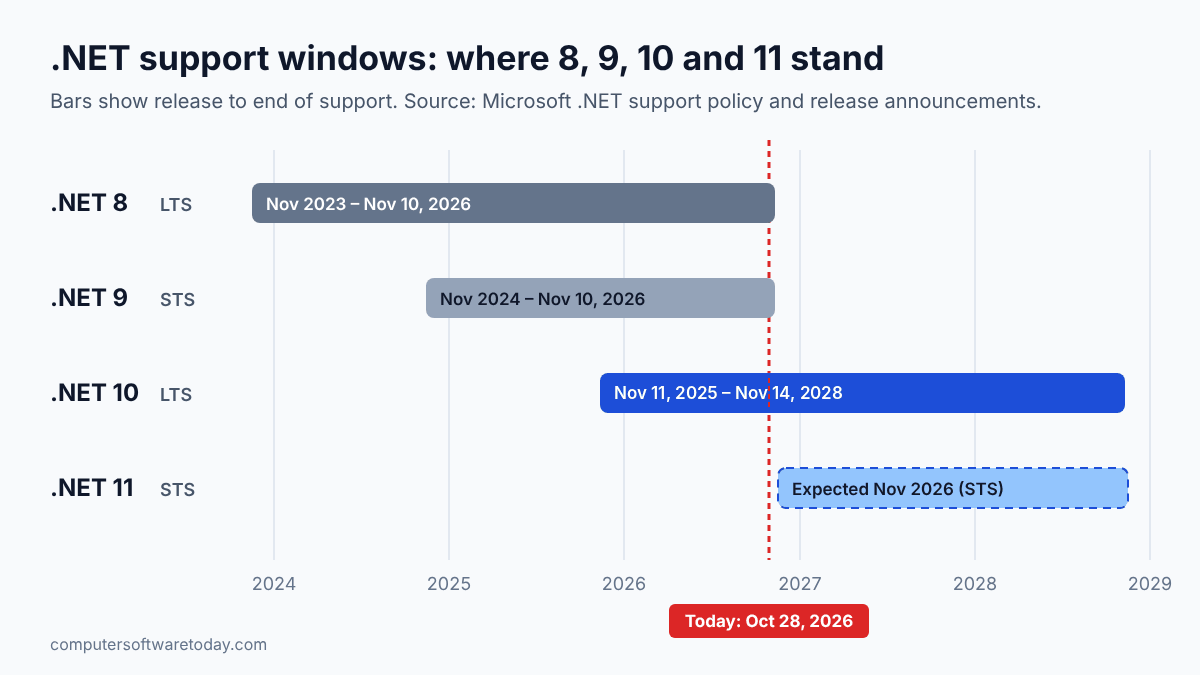
The timing is what makes this release urgent rather than optional. Microsoft changed the Standard Term Support policy in 2025 so that STS releases now get 24 months instead of 18. The side effect is that .NET 9 (STS) and .NET 8 (LTS) reach end of support on the same day: November 10, 2026. Microsoft’s end-of-support post for .NET 8 and 9 is clear that apps will keep running after that date, but they stop getting security fixes. If you run anything internet-facing, that is not a place you want to be.
How does .NET 10 support compare to .NET 8 and .NET 9?
.NET 10 is the only one of the three still supported after November 10, 2026. .NET 8 and .NET 9 end on that date, and .NET 10 runs to November 2028.
| Version | Type | Released | End of support | Status on Oct 28, 2026 |
|---|---|---|---|---|
| .NET 8 | LTS | November 14, 2023 | November 10, 2026 | Two weeks left |
| .NET 9 | STS (24 months) | November 12, 2024 | November 10, 2026 | Two weeks left |
| .NET 10 | LTS | November 11, 2025 | November 14, 2028 | Current LTS |
Microsoft’s releases and support page spells out the rules: LTS releases get at least three years, STS releases get 24 months, and you are only supported on the latest patch of a given version. That last point matters more than people think. “We’re on .NET 10” doesn’t count if you’re six patches behind.
.NET 11 is on the way as well. Release Candidate 2 shipped in October 2026 with a go-live license, as InfoQ reported, and Microsoft normally ships the final release in November. It is an STS release, so under the 24-month policy its support should end at about the same time as .NET 10’s. For most business apps I would still standardize on 10 and let 11 prove itself first.
Which C# 14 features will you actually use?
The field keyword, null-conditional assignment, and extension members are the three that show up in ordinary business code. The rest mostly help library authors and performance-sensitive code.
C# 14 ships with the .NET 10 SDK and Visual Studio 2026. The full list is on Microsoft’s What’s new in C# 14 page. Here are the ones worth learning first.
The field keyword
You no longer have to declare a private backing field just to add one line of validation to a property. Inside an accessor, field refers to the compiler-generated backing field:
public string Name
{
    get;
    set => field = value?.Trim() ?? throw new ArgumentNullException(nameof(value));
}
Small change, but in a codebase full of DTOs and view models it removes a lot of clutter.
Null-conditional assignment
The ?. operator now works on the left side of an assignment. The right side is only evaluated if the target isn’t null:
// Before
if (customer is not null)
{
    customer.LastOrder = GetCurrentOrder();
}

// C# 14
customer?.LastOrder = GetCurrentOrder();
Extension members
Extension methods have been around since C# 3. C# 14 adds extension blocks, which let you declare extension properties and static extension members too:
public static class EnumerableExtensions
{
    extension<T>(IEnumerable<T> source)
    {
        public bool IsEmpty => !source.Any();
    }
}

// usage
if (orders.IsEmpty) { ... }
Your existing this-parameter extension methods keep working. You don’t have to rewrite anything.
Also new: implicit conversions between arrays, Span<T>, and ReadOnlySpan<T>, partial constructors and events, and ref/out modifiers on lambda parameters without spelling out the types. They’re useful, but you’ll notice them less often.
What’s new in the .NET 10 runtime and SDK?
The runtime gets faster through JIT improvements and smaller, quicker Native AOT output. The SDK adds one-shot tool execution, file-based C# apps, and the SLNX solution format.
On the runtime side, Microsoft lists better inlining and devirtualization, improved code generation for struct arguments, AVX10.2 and Arm64 SVE support, and more stack allocation. You don’t change any code to get these. Retarget and rebuild.
The SDK changes are the ones I notice day to day:
- File-based apps. You can run a single
.csfile withdotnet run app.cs, no project file needed, and in .NET 10 you can also publish it, including as Native AOT. For admin scripts on a Windows server, this is a nice alternative to PowerShell when the logic gets hairy. dotnet tool execanddnx. These run a .NET tool once without installing it globally, the same idea asnpx.- SLNX solution files. The new XML-based solution format is much easier to read and merge than the old
.slnformat. - NuGet auditing of transitive packages.
dotnet restorenow warns about vulnerable packages deep in your dependency tree by default, anddotnet package update --vulnerableupdates them. - Tab completion scripts for bash, zsh, fish, PowerShell, and nushell.
What changed in ASP.NET Core 10 and EF Core 10?
ASP.NET Core 10 adds passkey support in Identity, built-in validation for minimal APIs, Server-Sent Events, and OpenAPI 3.1 by default. EF Core 10 adds vector search, named query filters, and LeftJoin/RightJoin.
The ASP.NET Core items I’d look at first:
- Minimal API validation. Call
builder.Services.AddValidation()and data annotations on your request types are enforced automatically. This was the main thing that sent people back to controllers. - Passkeys (WebAuthn/FIDO2) in ASP.NET Core Identity, so you can offer passwordless sign-in without a third-party library.
- Server-Sent Events through
TypedResults.ServerSentEvents(). For one-way live updates like progress bars or dashboards, SSE is simpler than SignalR. - OpenAPI 3.1 by default, with YAML output available.
- Memory pool eviction, so a long-running Kestrel process gives idle memory back instead of holding onto it after a traffic spike.
In EF Core 10, if you’re on SQL Server 2025 or Azure SQL, there’s vector search through VECTOR_DISTANCE() and support for the native json column type. For everyone else, the practical wins are LeftJoin and RightJoin operators (no more GroupJoin/DefaultIfEmpty gymnastics), named query filters so you can switch off one global filter without disabling all of them, and ExecuteUpdate accepting regular lambdas.
How do you upgrade a project from .NET 8 or 9 to .NET 10?
Install the .NET 10 SDK, change TargetFramework to net10.0, update Microsoft packages to 10.x, build, fix warnings, test, then update your servers and pipelines.
For a typical ASP.NET Core app, this is the order I’d work in:
- Install the SDK and confirm it.
dotnet --list-sdks dotnet --version - Update
global.jsonif you pin the SDK. Otherwise the old SDK will keep building your project and you’ll wonder why nothing changed.{ "sdk": { "version": "10.0.100", "rollForward": "latestFeature" } } - Retarget every project. If you use
Directory.Build.props, it’s one line:<TargetFramework>net10.0</TargetFramework> - Update packages. Move
Microsoft.AspNetCore.*,Microsoft.EntityFrameworkCore.*, andMicrosoft.Extensions.*to 10.x together. Mixed major versions cause strange runtime errors.dotnet list package --outdated dotnet package update --vulnerable - Build with warnings visible and read them. The new obsoletion warnings tell you exactly what has to change.
dotnet build dotnet test - Update hosting. On IIS, install the ASP.NET Core 10 Hosting Bundle on the server before you deploy. In containers, move to the
mcr.microsoft.com/dotnet/aspnet:10.0image. In CI, changedotnet-versionto10.0.x.
The old .NET Upgrade Assistant is officially deprecated. Microsoft now points you to the GitHub Copilot modernization agent in Visual Studio 2026 and Visual Studio 2022 17.14.16 or later. For an 8-to-10 move I honestly don’t think you need either tool. The steps above, run by hand, take an afternoon for most apps.
What breaks when you upgrade to .NET 10?
Most apps upgrade cleanly. The common surprises are cookie-auth API endpoints returning 401 instead of redirecting, new obsoletion warnings, Ubuntu-based container images, and stricter NuGet restore checks.
Microsoft keeps the full list on the .NET 10 breaking changes page. These are the ones I’d check before anything else:
- Cookie auth no longer redirects API calls. Endpoints recognized as APIs (
[ApiController], minimal APIs returning JSON, SignalR) now return 401/403 instead of a 302 to the login page. That’s the behavior you wanted all along, but any JavaScript that was watching for the redirect will need a fix. - Obsoletions.
WebHostBuilder/IWebHost,AddRazorRuntimeCompilation,IActionContextAccessor, andForwardedHeadersOptions.KnownNetworks(nowKnownIpNetworks) are all marked obsolete. If your build usesTreatWarningsAsErrors, they will fail it. - Container base images switched from Debian to Ubuntu. If your Dockerfile runs
apt-get installwith Debian-specific package names, check it. - NuGet restore is stricter. A
PackageReferencewith no version is now an error, and transitive vulnerability audits can surface warnings that break builds that treat warnings as errors. - The
fieldkeyword can collide. If a class already has a member namedfield, the compiler warns (CS9258) that the name now means the backing field inside property accessors. Usethis.fieldor@field. - Span overload resolution. C# 14’s new span conversions can make some calls pick a
Span<T>overload where they used to pickIEnumerable<T>. The compiler breaking changes doc covers the edge cases, including a runtime crash with covariant arrays. Rare, but it’s exactly the kind of bug that only a test suite catches.
Should you skip .NET 10 and wait for .NET 11?
No. .NET 8 and 9 lose support before .NET 11 has any track record, and .NET 10 is supported until 2028. Upgrade to 10 now and think about 11 later.
Waiting would leave you on an unpatched runtime for weeks or months, and then you’d be jumping straight onto a brand-new STS release. Since both 10 and 11 should be supported until about the same date, choosing 11 buys you no extra support time. All it gets you is newer features in exchange for less time in production.
My usual approach for my own apps is to stay on LTS and treat STS releases as something to test against. If a library I depend on needs 11, I’ll move. Otherwise .NET 10 is where I plan to sit until the next LTS, which on Microsoft’s normal schedule would be .NET 12.
Bottom line
.NET 10 isn’t a dramatic release, and that’s fine. It’s a solid LTS with a few C# features that make code shorter, a faster runtime you get for free, and enough ASP.NET Core improvements that minimal APIs finally feel complete. The real reason to move is the calendar: .NET 8 and 9 stop getting security fixes on November 10, 2026. Retarget, update your packages, install the new Hosting Bundle on your servers, and run your tests. For most apps that’s an afternoon. Leaving it until after something goes wrong will take a lot longer.
FAQ
Is .NET 10 an LTS release?
Yes. .NET 10 is a Long Term Support release. It shipped on November 11, 2025 and is supported until November 14, 2028.
When do .NET 8 and .NET 9 reach end of support?
Both reach end of support on November 10, 2026. After that, they get no more security patches or technical support from Microsoft.
Which C# version comes with .NET 10?
.NET 10 ships with C# 14. That’s the version that adds the field keyword, extension members, null-conditional assignment, and implicit span conversions.
Do I need Visual Studio 2026 for .NET 10?
Visual Studio 2026 includes the .NET 10 SDK and C# 14 support out of the box. You can also build .NET 10 projects with the command-line SDK in any editor, including VS Code.
Is the .NET Upgrade Assistant still supported?
No. Microsoft has officially deprecated it and recommends the GitHub Copilot modernization agent instead. For a straightforward .NET 8 to 10 upgrade, retargeting by hand usually works fine.
Will my .NET 8 app stop working on November 10, 2026?
No, it will keep running. It just won’t get security fixes anymore, so new vulnerabilities in the runtime or ASP.NET Core stay unpatched.
Featured image: Photo by Patrick Martin on Unsplash.
About The Author

