
How to Block AI Scrapers and Bad Bots on IIS, nginx and Apache
To protect a site from AI scrapers and bad bots, use robots.txt to tell the well-behaved crawlers what they may do, then block the ones that ignore it at the web server (IIS, nginx or Apache) by user agent, IP range or ASN. A CDN like Cloudflare adds bot detection on top. Start by reading your logs so you know who’s actually visiting.
Why are AI scrapers and bots a problem for small sites?
Bots cost you bandwidth and CPU, copy your content without sending visitors back, and pollute your analytics. If you run ads, fake page views drag down your revenue per thousand views and can attract invalid-traffic scrutiny.
Not all bots are bad. Googlebot and Bingbot are how people find you. The trouble is the rest of the crowd: AI training crawlers, SEO tools you never signed up for, content scrapers that republish your articles, and plain bulk downloaders running from cloud servers.
I host about twenty sites on a single Windows Server VPS, so this isn’t theoretical for me. The pattern to watch for is a site where page views climb while ad impressions stay flat, usually with the extra traffic coming from data-center IP ranges rather than home or mobile networks. Real readers load ads. Bulk scrapers usually don’t. That gap is the clearest bot signal you’ll ever get, and it’s a good reason to start blocking bulk scrapers by user agent at the web server.
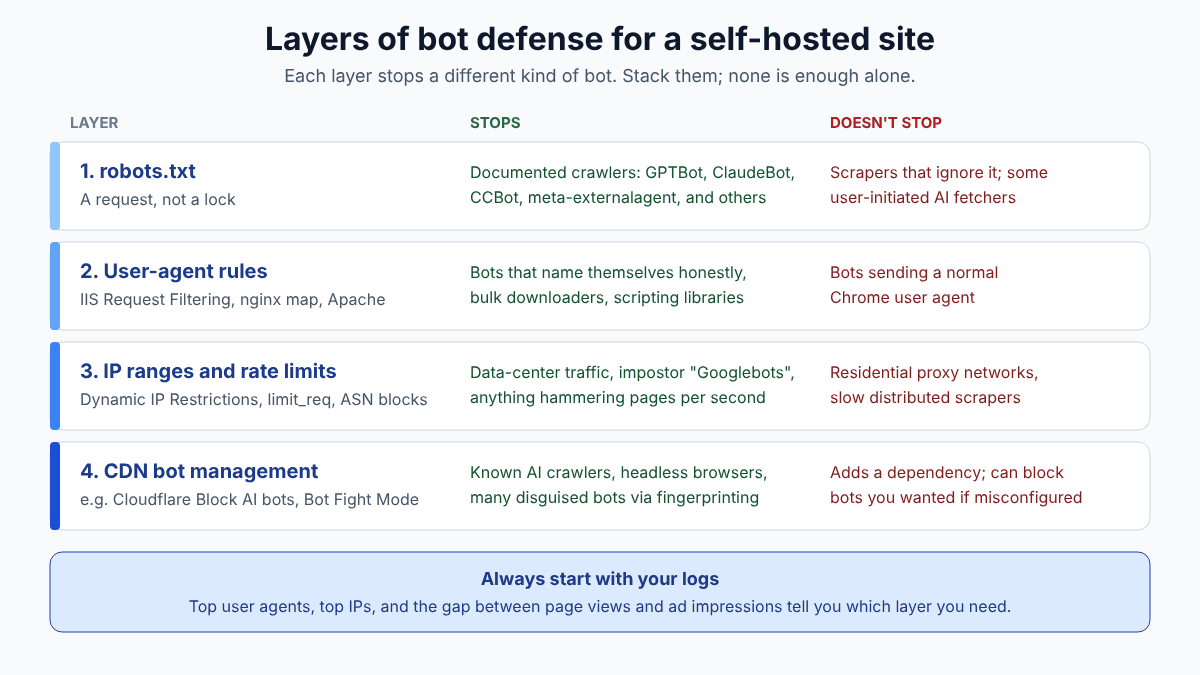
The rest of this article is the approach I’d recommend to anyone running their own server: understand the crawlers, decide what you allow, then enforce it at the layer that can actually enforce things.
What can robots.txt do, and what can’t it do?
robots.txt is a polite request, not a lock. Reputable crawlers from Google, OpenAI, Anthropic, Apple and Common Crawl honor it; scrapers that don’t care about your rules will simply ignore it.
It’s still worth doing, because the big AI companies document their crawlers and say they follow it. That handles a large share of the volume with one text file. A typical setup that opts out of AI training while staying in search looks like this:
# Opt out of AI model training
User-agent: GPTBot
Disallow: /

User-agent: ClaudeBot
Disallow: /

User-agent: CCBot
Disallow: /

User-agent: Google-Extended
Disallow: /

User-agent: Applebot-Extended
Disallow: /

User-agent: meta-externalagent
Disallow: /

# Everyone else, including Googlebot and Bingbot
User-agent: *
Allow: /
Sitemap: https://www.example.com/sitemap.xml
What robots.txt can’t do:
- Stop anyone who ignores it. There’s no enforcement.
- Stop fetches a user triggers inside an AI tool. OpenAI, Perplexity and Meta all say their user-initiated fetchers may not follow robots.txt.
- Stop crawlers that disguise themselves. In August 2025 Cloudflare accused Perplexity of using undeclared crawlers that posed as Chrome on macOS and rotated IPs; Perplexity disputed the claims.
- Remove content that’s already been collected.
Which AI crawler user agents should you know about?
The major AI companies each run separate bots for training, search indexing and user-requested fetches. Blocking the training bot usually doesn’t hurt you; blocking the search bot removes you from that AI’s answers.
| User agent / token | Company | Purpose | Honors robots.txt? |
|---|---|---|---|
| GPTBot | OpenAI | Training data | Yes |
| OAI-SearchBot | OpenAI | ChatGPT search results | Yes |
| ChatGPT-User | OpenAI | Fetches a page when a user asks | “May not apply” |
| ClaudeBot | Anthropic | Training data | Yes |
| Claude-SearchBot | Anthropic | Search quality | Yes |
| Claude-User | Anthropic | Fetches for a user’s question | Yes |
| PerplexityBot | Perplexity | Search index (not training, per docs) | Yes |
| Perplexity-User | Perplexity | Fetches for a user’s question | “Generally ignores” |
| Google-Extended | Token only: Gemini training and grounding | Yes (no separate UA) | |
| Applebot-Extended | Apple | Token only: Apple AI training | Yes (no separate UA) |
| meta-externalagent | Meta | Training and indexing | Yes |
| CCBot | Common Crawl | Open web archive used by many AI models | Yes |
Sources for the table: OpenAI’s crawler overview, Anthropic’s crawler help article, Perplexity’s bot docs, Google’s common crawlers list, plus Apple’s and Meta’s crawler pages. Two notes. Google-Extended and Applebot-Extended aren’t crawlers; they’re robots.txt tokens that control how data collected by Googlebot and Applebot is used, so you’ll never see them in a log. And Google says Google-Extended doesn’t affect Search inclusion or ranking.
My own rule of thumb: block the training bots if you want, but think hard before blocking OAI-SearchBot, Claude-SearchBot or PerplexityBot. Those are how AI answers cite and link to you.
How do you find bad bots in your server logs?
Group your access logs by user agent and by IP, sort by request count, and look for heavy hitters that aren’t search engines. Then check whether those IPs belong to cloud providers rather than home or mobile networks.
On IIS, W3C logs live under C:\inetpub\logs\LogFiles\W3SVC<site id>\ by default. The field order depends on your logging settings, so this PowerShell reads the #Fields header instead of guessing column numbers:
# Top 20 user agents in the last 7 IIS log files for site 1
$files = Get-ChildItem C:\inetpub\logs\LogFiles\W3SVC1\u_ex*.log |
         Sort-Object LastWriteTime | Select-Object -Last 7
$rows = foreach ($f in $files) {
  foreach ($line in Get-Content $f) {
    if ($line.StartsWith('#Fields:')) { $fields = $line.Substring(9).Split(' '); continue }
    if ($line.StartsWith('#')) { continue }
    $v = $line.Split(' ')
    [pscustomobject]@{
      UA = $v[[array]::IndexOf($fields, 'cs(User-Agent)')]
      IP = $v[[array]::IndexOf($fields, 'c-ip')]
    }
  }
}
$rows | Group-Object UA | Sort-Object Count -Descending |
        Select-Object -First 20 Count, Name
Swap UA for IP in the last line to see top addresses. On Linux with nginx or Apache in the standard combined log format, the user agent is the sixth quote-delimited field:
awk -F'"' '{print $6}' /var/log/nginx/access.log | sort | uniq -c | sort -rn | head -20
awk '{print $1}' /var/log/nginx/access.log | sort | uniq -c | sort -rn | head -20
What to look for: user agents with “bot,” “spider,” “crawl,” “python-requests,” “curl,” “Go-http-client” or “HeadlessChrome”; one IP or one subnet making thousands of requests; and traffic from hosting providers in places your audience doesn’t live. A WHOIS or ASN lookup on the top IPs tells you quickly whether it’s a residential ISP or a cloud data center.
One gotcha: if your site sits behind Cloudflare, your logs show Cloudflare’s IPs unless you restore the visitor IP from the CF-Connecting-IP header.
How do you block bots by user agent in IIS?
Use IIS Request Filtering with a filtering rule that scans the User-Agent header for deny strings. Matching requests get a 404, logged with substatus 404.19, so you can confirm the rule is working.
This goes inside <system.webServer> in the site’s web.config, or at the server level in applicationHost.config if you want it on every site. The format comes straight from Microsoft’s filteringRules reference:
<security>
  <requestFiltering>
    <filteringRules>
      <filteringRule name="Block AI and bulk scrapers" scanUrl="false" scanQueryString="false">
        <scanHeaders>
          <add requestHeader="User-Agent" />
        </scanHeaders>
        <denyStrings>
          <add string="GPTBot" />
          <add string="CCBot" />
          <add string="Bytespider" />
          <add string="python-requests" />
        </denyStrings>
      </filteringRule>
    </filteringRules>
  </requestFiltering>
</security>
Leaving out <appliesTo> means the rule covers every request. Build your deny list from what your own logs show, not from someone’s giant copy-paste list; overly broad strings like “bot” will block Googlebot and Bingbot too.
After saving, check the logs for sc-status 404 with sc-substatus 19. If you’d rather return a 403, the URL Rewrite module can do that with a condition on {HTTP_USER_AGENT} and an AbortRequest or CustomResponse action, but Request Filtering is built in and fast.
How do you block bots in nginx and Apache?
In nginx, use a map on $http_user_agent and return 403 for matches. In Apache, use mod_rewrite or SetEnvIfNoCase with Require rules to deny matching user agents.
nginx (the map goes in the http block, the if in your server block):
map $http_user_agent $blocked_bot {
    default        0;
    ~*GPTBot       1;
    ~*CCBot        1;
    ~*Bytespider   1;
    ~*python-requests 1;
}

server {
    # ...
    if ($blocked_bot) { return 403; }
}
Apache 2.4 (in the vhost or .htaccess):
SetEnvIfNoCase User-Agent "GPTBot"     blocked_bot
SetEnvIfNoCase User-Agent "CCBot"      blocked_bot
SetEnvIfNoCase User-Agent "Bytespider" blocked_bot

<RequireAll>
    Require all granted
    Require not env blocked_bot
</RequireAll>
Test with curl -A "GPTBot" -I https://yoursite.com/ and confirm you get a 403 (or 404 on IIS), then test with a normal browser user agent to make sure you didn’t lock yourself out.
What if bots fake their user agent?
Then user-agent rules won’t catch them, and you need IP-based controls: block or rate-limit the offending ranges or ASNs, and verify that anything claiming to be Googlebot really comes from Google.
User-agent blocking catches the honest and the lazy. Bulk scrapers are often both, which is why it works better than you’d expect. But anyone serious will send a Chrome user agent.
Layered options, roughly in order of effort:
- IP and range blocks. IIS has IP Address and Domain Restrictions; nginx has
deny; Apache hasRequire not ip. Block the specific cloud ranges that show up in your logs. - Rate limiting. IIS Dynamic IP Restrictions can deny IPs that exceed a request rate. nginx has
limit_req. Humans don’t load 50 pages a second. - Verify search engines. Google’s docs say its crawlers’ reverse DNS resolves to
googlebot.comhostnames, and it publishes IP ranges. A “Googlebot” from a random VPS is not Googlebot. - Use the vendors’ published IP lists. OpenAI and Perplexity publish JSON lists of their crawler IPs, which lets you allow the real bot and block impostors using its name.
Be careful with whole-country blocks. They’re blunt and they catch real readers, VPN users and sometimes legitimate crawlers.
What does Cloudflare offer for blocking AI bots?
Cloudflare’s free plan includes Bot Fight Mode, a one-click “Block AI bots” setting, AI Labyrinth and managed robots.txt. Paid plans add bot scores and finer control.
In July 2025 Cloudflare started blocking AI crawlers by default for its customers, letting site owners allow specific crawlers and introducing a pay-per-crawl option. Per Cloudflare’s free-plan bot docs, Bot Fight Mode challenges simple bots from cloud hosting providers and headless browsers across the whole domain.
Putting a CDN in front of a small VPS has other benefits too: it absorbs the traffic before your server sees it. The trade-offs are another dependency, another dashboard, and settings that can block things you wanted, so after enabling anything, check that Googlebot and your AI search bots of choice can still reach you.
How do fake page views hurt ad revenue?
Bots inflate your page view count without generating real ad impressions or clicks, so earnings per thousand views drop. Bots that do trigger ads are invalid traffic, which Google filters out and can hold against your account.
AdSense defines Page RPM as estimated earnings divided by page views, times 1,000. Any denominator padding makes the number look worse. If your analytics or server stats say 200,000 views and only a fraction are real people, you’ll misjudge which pages earn, which content to write, and what your site is worth.
The worse case is bots that execute your ad code. Google’s invalid traffic policy lists “robots” and automated traffic sources among the examples. Google filters it, but a site that attracts a lot of it can face ad serving limits, and you don’t want to explain bot traffic you never invited.
That’s why a gap between page views and ad impressions deserves a look. Huge page counts with almost no impressions usually means visitors that inflate the numbers without ever being real readers.
Bottom line
Treat bots the way you’d treat any other load on your server: measure first, then decide. Put a sensible robots.txt in place for the crawlers that respect it, keep the AI search bots you want citing you, and block the rest at the web server where the rule actually has teeth. On IIS, a Request Filtering rule and twenty minutes with your log files will take care of most bulk scrapers. When they start faking user agents, move up to IP ranges, rate limits or a CDN. And if your page views and ad impressions ever disagree by a few orders of magnitude, believe the ad impressions.
FAQ
Does blocking GPTBot remove my site from ChatGPT?
Not from ChatGPT search. OpenAI uses GPTBot for training data and OAI-SearchBot for search results. You can block GPTBot and still allow OAI-SearchBot so ChatGPT can cite and link to you.
Will blocking Google-Extended hurt my Google rankings?
Google says no. Google-Extended is a robots.txt control token for Gemini training and grounding, and Google states it doesn’t affect inclusion in Google Search or act as a ranking signal.
Why do bots show in my analytics but not in AdSense?
Many bots load HTML but don’t run ad scripts, so they count as page views in server stats or some analytics tools without producing ad impressions. Ad traffic from bots that does occur is treated as invalid and filtered.
Is user-agent blocking enough?
It stops honest crawlers and lazy scrapers, which is often most of the volume. Bots that spoof a browser user agent need IP-range blocks, rate limiting or a bot-detection service such as Cloudflare.
What status code does IIS return for a request filtering block?
IIS returns 404 to the client and logs substatus 404.19, “Denied by filtering rule,” which makes the blocks easy to find in your W3C logs.
Featured image: Photo by Brett Sayles on Pexels.
About The Author

