
AI Coding Assistants Compared (Late 2026): Which to Choose
In late 2026 the serious AI coding assistants are Claude Code, GitHub Copilot, Cursor, OpenAI Codex and Google’s Antigravity, with Kiro and Devin Desktop close behind. All of them now run agents that edit files and run commands; they differ in where they live, how they bill, and how much control you keep. Here is how they compare and how to pick.
Which AI coding assistants actually matter in late 2026?
Five tools cover most professional use: Claude Code, GitHub Copilot, Cursor, OpenAI Codex and Google Antigravity. The market also consolidated hard this year, so some names you remember have changed owners or been retired.
If you last looked at this market a year ago, three changes matter:
- Gemini CLI handed off to Antigravity CLI. Google announced in May 2026 that Gemini CLI and the Gemini Code Assist IDE extensions would stop serving Google AI Pro, Ultra and free individual users on June 18, 2026. The replacement is Antigravity CLI, a Go rewrite that shares its agent harness with the Antigravity 2.0 desktop app. Paid Code Assist Standard and Enterprise customers kept their access.
- Cursor now belongs to SpaceX. SpaceX agreed to buy Cursor for $60 billion in stock in June, and on October 12 Cursor was folded into The X Subscription alongside Grok and X Premium.
- Windsurf is now Devin Desktop. Cognition, which acquired Windsurf in 2025, renamed the editor in June 2026.
Meanwhile, the old “autocomplete versus chat” split is gone. Every tool here has an agent mode that reads the codebase, edits several files, runs the build and tests, and asks before doing anything risky. The real question is where you want it to run and how you want to pay.
How do the main AI coding assistants compare?
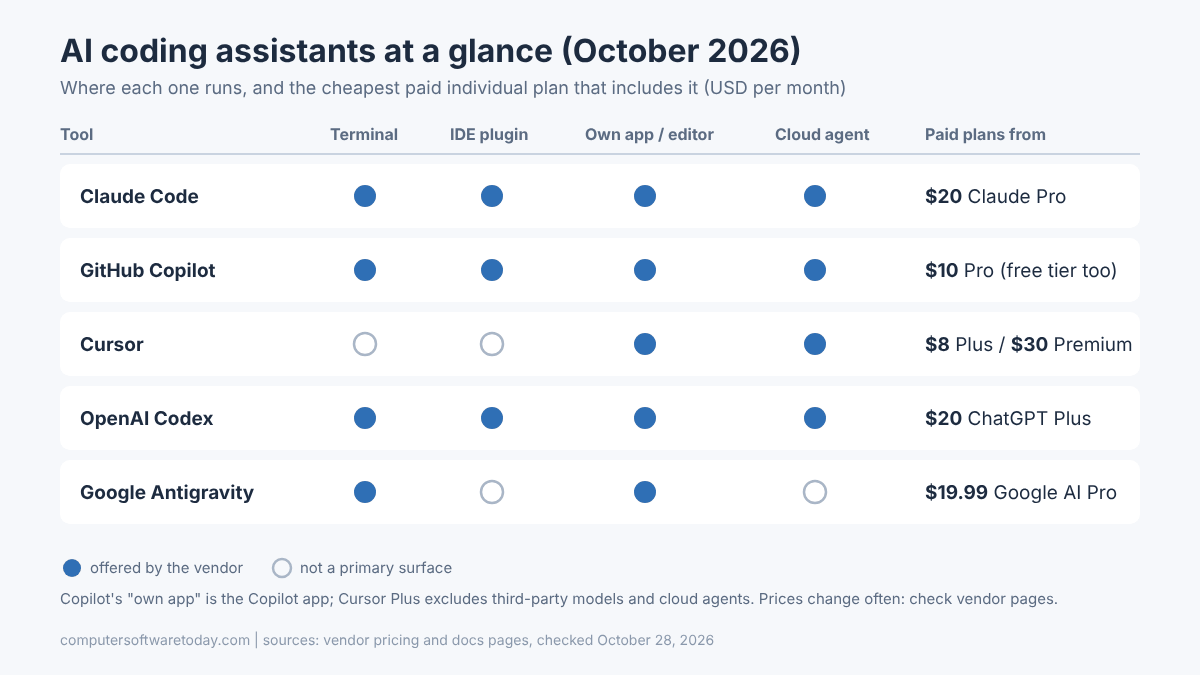
The biggest differences are form factor (terminal, IDE plugin, standalone editor or cloud) and billing model. Entry prices cluster around $10 to $20 a month, with heavy-use tiers at $100 to $200.
| Tool | Where it runs | Free option | Individual paid plans (USD/month) | Team pricing | Best fit |
|---|---|---|---|---|---|
| Claude Code | Terminal CLI, VS Code, JetBrains, desktop app, web, mobile | No (Claude Free excludes Claude Code) | Pro $20 ($17 annual); Max $100 (5x) or $200 (20x) | Team $25 standard seat, $125 premium seat (monthly) | Terminal-first developers, large refactors, scripting and automation |
| GitHub Copilot | VS Code, Visual Studio, JetBrains and others; CLI; Copilot app; cloud agent on GitHub | Yes, limited | Pro $10; Pro+ $39; Max $100 | Business $19/seat; Enterprise $39/seat | Teams already on GitHub, Visual Studio and .NET shops, budget-conscious users |
| Cursor | Its own editor (VS Code-based) plus cloud agents | Yes, limited | Plus $8; Premium $30; Super $100; Ultra $200 (bundled with Grok and X Premium) | Same tiers per seat | Developers who want an AI-first editor and do not mind switching IDEs |
| OpenAI Codex | ChatGPT app, CLI, IDE extension, cloud environments | Limited access on ChatGPT Free | ChatGPT Plus $20; Pro $100 or $200 | Business: usage-based Codex-only option or per-seat plan | People already paying for ChatGPT; parallel cloud tasks |
| Google Antigravity | Antigravity 2.0 desktop app, Antigravity CLI | Yes, basic weekly limits | Google AI Pro $19.99; Ultra $99.99 (5x) or $199.99 (20x) | Through Google Cloud | Google ecosystem users, long-context work, budget experiments |
Prices are from each vendor’s pricing page as of October 28, 2026: Claude, GitHub Copilot, Cursor, Codex and Google AI plans. They have changed several times this year, so check before you buy.
What is Claude Code good at?
Claude Code is the strongest choice if you live in a terminal and want an agent that can work through a large, multi-step change on its own. It runs the same engine across the CLI, IDE extensions, desktop and web.
Anthropic’s platform docs list the CLI, a desktop app, VS Code and JetBrains extensions, a web version that keeps running after you disconnect, and mobile access. The CLI is the full-featured one: scripting and the Agent SDK are CLI-only. It also plugs into GitHub Actions, GitLab CI/CD and Slack, and it speaks MCP for connecting your own tools.
Where it shines in my experience is the kind of task that touches twenty files: rename a concept across a solution, migrate a data access layer, add logging everywhere a pattern appears. You describe the goal, it plans, edits, builds and runs the tests, and you review the diff. Project-level instructions in a CLAUDE.md file keep it on your conventions.
Downsides: there is no free tier, and heavy agent use on Pro hits limits quickly. Serious daily users tend to end up on a Max plan. It also rewards developers who are comfortable reviewing large diffs; if you want line-by-line suggestions while you type, that is not its main mode.
What is GitHub Copilot good at?
Copilot is the safest default for teams: it works inside the IDEs people already use, including full Visual Studio, it is cheap at the entry level, and it ties directly into GitHub issues and pull requests.
For .NET developers this matters: Copilot is built into Visual Studio itself, not just VS Code. The April 2026 Visual Studio update added the ability to start a cloud agent session from the agent picker (it opens an issue and a pull request and works remotely while you keep coding) and a debugger agent that reproduces a bug from an issue and proposes a fix based on live execution.
Copilot also changed how it bills. As of June 1, 2026, individual plans moved to usage-based billing with AI credits: Pro at $10 includes 1,500 credits, Pro+ at $39 includes 7,000, and the new Max plan at $100 includes 20,000. Code completions and next edit suggestions stay unlimited on paid plans; chat and agent work draws down credits. Organizations pay $19 (Business) or $39 (Enterprise) per seat with pooled credits, and overage at $0.01 per credit.
The tradeoff: Copilot’s agent is good, but it is a generalist that has to work across many IDEs. Heavy agent users sometimes find credits disappear faster than expected, so watch the usage page for the first month.
What is Cursor good at now?
Cursor is still the most polished AI-first editor, with tight integration between chat, agent and editing. The October 2026 move into The X Subscription changed its pricing and its default models, so read the new terms carefully.
Cursor is a fork of VS Code, so your extensions and keybindings mostly carry over. The experience is the draw: the agent, inline edits and codebase search feel like one product rather than a plugin bolted on.
The new plans, per Cursor’s pricing help page, run from Plus at $8 through Premium at $30, Super at $100 and Ultra at $200. Every paid plan includes a weekly pool for Cursor’s own models, shared with Grok. The fine print matters: Plus does not include Auto, Cloud Agents, Bugbot or third-party models. On Premium and above, third-party models (Claude, GPT and so on) are available but billed separately at API list prices through top-ups. Existing subscribers can keep their old plan or switch.
So if you chose Cursor because it let you pick the best model of the month for a flat fee, that deal has changed. If you are happy with Cursor’s and Grok’s models, the new Premium tier is good value.
What is OpenAI Codex good at?
Codex is the natural pick if you already pay for ChatGPT. It runs in the ChatGPT app, a CLI, an IDE extension and cloud environments, and it is good at farming out several tasks in parallel.
Codex is included with ChatGPT plans rather than sold separately: Free gets limited access, Plus is $20 a month with expanded usage, and Pro comes in a $100 tier (5x Plus usage) and a $200 tier (20x). Business customers can choose a Codex-only option billed purely on usage, with no seat fee, which is handy if half your team never opens ChatGPT.
The workflow Codex does well is “fire and review”: kick off several well-scoped tasks in cloud environments, go do something else, and come back to diffs. The desktop app runs on both macOS and Windows. Like the others, it supports an API key for extra usage at standard API rates.
The weakness is the flip side of the strength. Cloud tasks work best when the task is clearly specified and the repo builds cleanly in a container. Legacy Windows-only builds are harder to set up there than on your own machine.
What about Google Antigravity, Kiro and the rest?
Google Antigravity is the one to try if you want a capable free tier or already pay for Google AI. Kiro (from AWS) and Devin Desktop are worth a look for spec-driven and autonomous workflows respectively.
Google Antigravity is now Google’s single developer agent platform: a desktop app plus Antigravity CLI. According to Google’s May 2026 plan update, Google AI Pro gives entry-level limits, a new $100 Ultra tier gives 5x, and the top Ultra tier (cut from $250 to $200) gives 20x. There is also a free developer tier with basic weekly rate limits. Note there is no one-to-one feature parity with the old Gemini CLI, so test any scripts that depended on it.
Kiro is an agentic IDE built around writing a spec first and then implementing it. Its pricing is credit-based: free with 50 credits, then Pro at $20, Pro+ at $40, Pro Max at $100 and Power at $200, with add-on credits at $0.04.
Devin Desktop (formerly Windsurf) and open-source agents such as Cline and Aider round out the field. The open-source tools let you bring your own API key or a local model, which matters if code cannot leave your network.
How should a working engineer choose an AI coding assistant?
Start from where you already work and how you want to pay, then run a two-week trial on real tickets in your own codebase. Benchmarks will not tell you how a tool handles your build, your conventions and your legacy code.
- Match your editor. Full Visual Studio user? Copilot is the path of least resistance. JetBrains Rider or IntelliJ? Copilot and Claude Code both have plugins. Happy in VS Code or the terminal? Everything works.
- Decide how much autonomy you want. If you want suggestions while you type, Copilot or Cursor. If you want to hand off a whole task and review the result, Claude Code or Codex.
- Check where code is allowed to go. For client or regulated code, read the data-use terms for business plans, or use a tool that supports your own API account or a local model.
- Estimate real usage, not list price. Agent work burns far more than chat. Plan on the next tier up if you use agents daily.
- Trial with the same three tasks. A bug fix, a small feature and a refactor across several files. Compare the diffs, not the demos.
- Keep the guardrails on. Approve commands, review every diff, and run your tests. The tools are good; they are not accountable for your production database.
For what it is worth, I do not think you need to pick only one. Plenty of developers keep a cheap Copilot plan for in-editor completions and pay for one agent-first tool for bigger jobs.
What do AI coding assistants really cost per month?
Expect $10 to $20 a month for light use and $100 to $200 for daily agent-driven work. Every major vendor now meters usage with credits, multipliers or weekly pools, so the sticker price is a floor, not a ceiling.
The pattern across vendors in 2026 is the same: a cheap entry tier, then a 5x tier around $100 and a 20x tier around $200. Claude (Max 5x and 20x), ChatGPT Pro, Google AI Ultra, Copilot Max, Cursor Super and Ultra, and Kiro all follow roughly that ladder. Beyond the plan, overage is billed at API rates or per-credit prices.
Two practical tips. First, set a spending cap wherever the vendor offers one, especially on team plans with pooled credits. Second, check usage after the first week; every tool has a usage page, and agent sessions on large repos can surprise you.
Bottom line
There is no single best AI coding assistant in late 2026, but there is usually an obvious best one for you. Visual Studio and GitHub-centric teams should start with Copilot. Terminal people who want an agent to carry real work should try Claude Code or Codex. Cursor is still a great editor, but re-read its new pricing. Whatever you choose, trial it on your own code for two weeks, cap your spend, and keep reviewing every diff like it came from a fast, confident new hire. Because that is roughly what it is.
FAQ
What is the cheapest AI coding assistant worth paying for?
GitHub Copilot Pro at $10 a month is the cheapest mainstream paid plan, with unlimited completions and 1,500 AI credits for chat and agent work. Cursor’s new Plus plan is $8 but excludes third-party models and cloud agents.
Is Gemini CLI still available?
Only for some users. Google stopped serving Gemini CLI for Google AI Pro, Ultra and free individual users on June 18, 2026, replacing it with Antigravity CLI. Paid Gemini Code Assist Standard and Enterprise customers and paid API key users kept access.
Which AI coding assistant works best with Visual Studio and .NET?
GitHub Copilot, because it is built into full Visual Studio, including agent mode, cloud agent sessions and a debugger agent. Claude Code and Codex work well on .NET code from the terminal or VS Code.
Does Claude Code have a free tier?
No. Claude Code is included with Claude Pro ($20 a month, or $17 billed annually), the Max plans at $100 and $200, and Team and Enterprise seats. The free Claude plan does not include it.
Who owns Cursor now?
SpaceX agreed to acquire Cursor for $60 billion in stock in June 2026. In October 2026 Cursor became part of The X Subscription, which bundles it with Grok and X Premium in tiers from $8 to $200 a month.
Can I use more than one AI coding assistant?
Yes, and many developers do. A common setup is an inexpensive Copilot plan for in-editor completions plus one agent-first tool such as Claude Code or Codex for larger, multi-file tasks.
Featured image: Photo by luis gomes on Pexels.
About The Author

