
.NET 8 and 9 End of Support: How to Upgrade to .NET 10
.NET 8 and .NET 9 both reach end of support on November 10, 2026. Your apps will keep running after that date, but Microsoft stops shipping security fixes for them. The supported way forward is .NET 10, the current LTS release, which is supported until November 14, 2028. Here is what changes, how to check what you run, and how to upgrade.
That’s less than two weeks from today. I’m upgrading one of my own .NET 8 apps to .NET 10 right now, so this is the checklist I’m actually working from, not a theoretical one.
When exactly do .NET 8 and .NET 9 reach end of support?
Both end on Tuesday, November 10, 2026. .NET 8 is an LTS release that got three years; .NET 9 is a Standard Term Support (STS) release that now gets 24 months, so they land on the same day.
STS releases used to get 18 months, which would have ended .NET 9 in May 2026. Microsoft extended STS to 24 months, and its end-of-support announcement for .NET 8 and 9 spells out the result: two versions, one deadline.
November 10 is also a Patch Tuesday. Microsoft says each version may get one final update that day if there’s a known critical issue. After that, nothing.
Both are already in the “maintenance” phase (security fixes only), as the .NET download page shows.
Which .NET versions are supported right now?
As of October 28, 2026, .NET 8, 9 and 10 are supported, and .NET 11 is a release candidate with go-live support. After November 10, only .NET 10 (and .NET 11, once it ships) will be.
| Version | Type | Released | End of support | Status on Oct 28, 2026 |
|---|---|---|---|---|
| .NET 6 | LTS | Nov 8, 2021 | Nov 12, 2024 | Out of support |
| .NET 7 | STS | Nov 8, 2022 | May 14, 2024 | Out of support |
| .NET 8 | LTS | Nov 14, 2023 | Nov 10, 2026 | Maintenance, ends in 13 days |
| .NET 9 | STS | Nov 12, 2024 | Nov 10, 2026 | Maintenance, ends in 13 days |
| .NET 10 | LTS | Nov 11, 2025 | Nov 14, 2028 | Active, current LTS |
| .NET 11 | STS | Expected Nov 2026 | Not yet published | Release candidate, go-live |
Dates come from Microsoft’s .NET and .NET Core support policy. .NET 11 is scheduled to launch at .NET Conf 2026, November 10–13. As an STS release under the current policy it should get two years, but Microsoft hasn’t posted its end date yet.
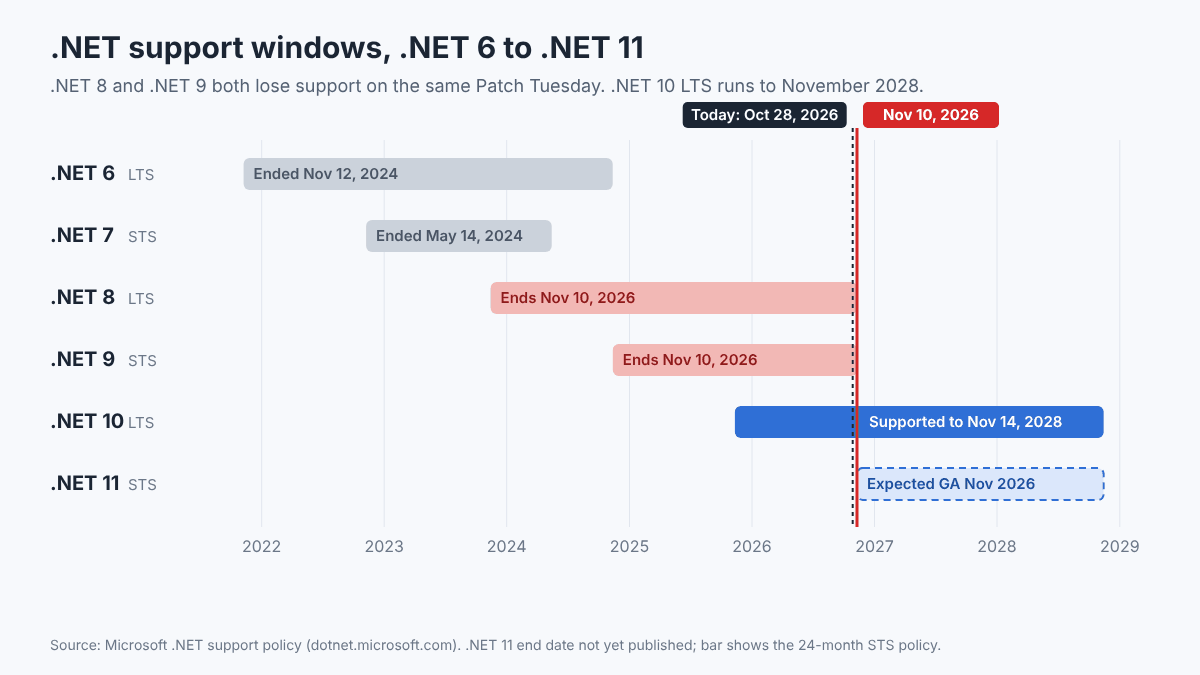
For most production apps, .NET 10 is the right target, not .NET 11. You get support through late 2028 instead of chasing a new version every year.
What does “end of support” actually mean?
It means no more security patches, bug fixes or Microsoft technical support. Your app does not stop working on November 11. It just stops getting fixed when the next vulnerability shows up.
Microsoft’s wording is blunt: after the date it “will no longer provide servicing updates, security fixes, or technical support” for these versions. The policy page adds that running out-of-support .NET “may put your applications, application data, and computing environment at risk.”
That matters because .NET gets security fixes almost every month, and ASP.NET Core, Kestrel and the crypto libraries are exactly what an internet-facing app exposes. After the deadline, new CVEs get fixed in .NET 10 and 11 only.
A few other places you’ll feel it:
- Visual Studio. A future Visual Studio 2022 servicing update will mark the .NET 8 and 9 components as out of support. Microsoft says existing installations aren’t affected, and there’s an option to remove out-of-support components.
- Azure App Service. Azure’s retirement notice says apps hosted on App Service “will continue to run, but security updates will no longer be available.” Azure Functions gets the same treatment.
- “Supported” means latest patch. Even on .NET 10, Microsoft only supports you on the latest servicing update. Being on .NET 10 and six patches behind is not much better than being on .NET 8.
Is .NET Framework 4.8 affected by the November 10 deadline?
No. .NET Framework 4.x is on a completely different lifecycle. Starting with 4.5.2, it’s treated as a component of Windows and is supported as long as the Windows version it runs on is supported.
The confusion is understandable, because “dot net” means two different products. The .NET Framework support policy says 4.8 and 4.8.1 follow “the lifecycle policy of the underlying Windows OS.” There’s no end date for them on their own.
One date to note: .NET Framework 4.6.2 ends support on January 12, 2027. Retargeting those apps to 4.8.1 is usually a small job.
How do I check which .NET version my app uses?
Look at two things: the TargetFramework in the project file, which tells you what the app was built for, and the runtimes installed on the server, which tell you what it can run on.
On your dev machine, list what’s installed:
dotnet --list-sdks
dotnet --list-runtimes
dotnet --info
Find the target framework for every project in a repo (PowerShell):
Get-ChildItem -Recurse -Filter *.csproj |
  Select-String -Pattern '<TargetFrameworks?>'
Anything showing net8.0 or net9.0 is on the clock.
On an IIS server: run dotnet --list-runtimes in an elevated prompt and look at the Microsoft.AspNetCore.App lines. Those come from the ASP.NET Core Hosting Bundle. If you don’t know what a deployed app targets, open its *.runtimeconfig.json in the site folder; the tfm value tells you (for example "tfm": "net8.0"). Self-contained deployments carry their own runtime, so they won’t show up in the server’s runtime list at all. Those need a rebuild and redeploy to get patched.
Microsoft’s guide to checking installed versions has more detail.
How do I upgrade an app from .NET 8 to .NET 10?
For a typical ASP.NET Core app it’s a retarget, a package update, an environment update and a test pass. Most of the time goes into testing, not editing.
- Install the .NET 10 SDK and update your IDE. Microsoft’s SDK and Visual Studio version table says targeting
net10.0is officially supported in Visual Studio 18.0 (Visual Studio 2026) and later. - Change the target framework in each project file:
<TargetFramework>net10.0</TargetFramework>If you use
Directory.Build.props, change it there once. - Update
global.jsonif you pin the SDK:{ "sdk": { "version": "10.0.100", "rollForward": "latestFeature" } } - Update packages. Move
Microsoft.AspNetCore.*,Microsoft.EntityFrameworkCore.*andMicrosoft.Extensions.*to 10.0.x. Then check third-party packages for .NET 10 support.dotnet list package --outdatedgives you the list. - Build and fix warnings. Several ASP.NET Core 10 changes are new obsolete warnings, not runtime failures. Read them; don’t just suppress them.
- Update Docker images. Switch to
mcr.microsoft.com/dotnet/sdk:10.0for the build stage andmcr.microsoft.com/dotnet/aspnet:10.0for the runtime stage. - Update CI. Bump the SDK in your pipeline (for example
dotnet-version: '10.0.x'in GitHub Actions’ setup-dotnet) and any build agent images. - Update IIS servers. Install the .NET 10 ASP.NET Core Hosting Bundle before you deploy, then restart IIS from an elevated prompt:
net stop was /y
net start w3svc
The .NET 8 runtime can stay installed side by side until every app on the box has moved.
- Test. Run your tests, then check authentication, background services and configuration by hand on a staging site.
- Deploy and clean up. Deploy, watch the logs for a day or two, then uninstall the .NET 8 runtime once nothing depends on it.
If you host several sites on one Windows Server like I do, schedule the Hosting Bundle install for a quiet window. It’s the one step that touches every site on the box at once.
What breaks when moving from .NET 8 to .NET 10?
Usually not much, but you’re crossing two releases, so read both lists: breaking changes in .NET 9 and breaking changes in .NET 10.
The items I’d check first in a typical web app:
- BinaryFormatter always throws (.NET 9). If anything still uses it, including an old caching or session library, it fails at runtime.
- Cookie login redirects disabled for known API endpoints (ASP.NET Core 10). API calls that used to get a 302 to the login page now get a 401.
- WebHostBuilder, IWebHost and WebHost are obsolete (ASP.NET Core 10). Old-style
Program.csfiles will light up with warnings. - Razor runtime compilation is obsolete (ASP.NET Core 10).
- Null values preserved in configuration (.NET 10). A null in one config source can now override a value from another.
- Default container images use Ubuntu (.NET 10). Debian images aren’t shipped for .NET 10; the default tags point to Ubuntu 24.04. If your Dockerfile runs
apt-get, test it.
The full ASP.NET Core list is in breaking changes in ASP.NET Core 10, along with the ASP.NET Core 9 to 10 migration guide.
Should I use the .NET Upgrade Assistant or GitHub Copilot?
The .NET Upgrade Assistant is officially deprecated. Microsoft now points you to its GitHub Copilot upgrade agent, which runs in Visual Studio, VS Code, the Copilot CLI and GitHub.com.
The Upgrade Assistant page now opens with that deprecation notice. The replacement assesses your solution, plans the work and makes changes in steps you can review or roll back. In Visual Studio, right-click the solution and choose Modernize.
My honest take: for a plain .NET 8 to .NET 10 web app, you don’t need either. Where the agent helps is the messy stuff, like moving from System.Data.SqlClient to Microsoft.Data.SqlClient. Either way, review every change like a pull request from a new hire.
What if I can’t upgrade before November 10?
Your app won’t break, but you need a plan and a date. Rank your apps by exposure, upgrade the internet-facing ones first, and keep internal tools on .NET 8 only briefly.
- Public-facing web apps and APIs: highest risk. These are the ones attackers can reach, so do them first.
- Internal apps behind a VPN or firewall: lower risk. A short slip is survivable if you have a scheduled upgrade date.
- Apps you didn’t build: ask the vendor for a .NET 10 version now. Microsoft recommends the same thing.
Either way, install the latest .NET 8 patch, plus the final one if Microsoft ships it on November 10.
If you truly can’t move for months, third-party vendors sell post-EOL patches. HeroDevs, for example, offers commercial “Never-Ending Support” for .NET 8. For a small shop, upgrading is almost always cheaper.
Bottom line
November 10 isn’t the day your apps die. It’s the day the next security hole stops getting fixed. For most ASP.NET Core apps, getting from .NET 8 to .NET 10 is an afternoon of edits and a day of testing. Do the internet-facing ones first, update the Hosting Bundle on your servers, and you’re covered until 2028.
FAQ
When does .NET 8 support end?
.NET 8 reaches end of support on November 10, 2026. After that, Microsoft releases no more security fixes, bug fixes or technical support for it.
Why does .NET 9 end on the same day as .NET 8?
Microsoft extended Standard Term Support releases from 18 to 24 months. .NET 9 shipped in November 2024, so its 24 months end on November 10, 2026, the same day as .NET 8.
Will my .NET 8 app stop working after November 10, 2026?
No. It keeps running, including on IIS and Azure App Service. It just won’t get security updates, so new vulnerabilities in the runtime or ASP.NET Core stay unpatched.
Should I upgrade to .NET 10 or .NET 11?
For most production apps, .NET 10. It’s the LTS release, supported until November 14, 2028. .NET 11 is an STS release that launches in November 2026 and gets a shorter support window.
Does this affect .NET Framework 4.8?
No. .NET Framework 4.8 and 4.8.1 are components of Windows and are supported as long as the Windows version they run on is supported. Only .NET Framework 4.6.2 has a nearby end date: January 12, 2027.
Is the .NET Upgrade Assistant still available?
It’s officially deprecated. Microsoft recommends the GitHub Copilot upgrade agent instead. For a simple .NET 8 to .NET 10 upgrade, editing the project files by hand works fine.
Featured image: Photo by AltumCode on Unsplash.
About The Author

