


Ollama lets you download and run open-weight language models such as Gemma 4, Qwen and gpt-oss on your own Windows PC or Mac, with no cloud account and no per-token bill. This guide covers the hardware you need, installation on both platforms, picking a model that fits your memory, and calling it from C# or Python.
What is Ollama and why run an LLM locally?
Ollama is a free, MIT-licensed tool that downloads, runs and serves open-weight language models on your own machine. It gives you a command line, a desktop app and a local REST API on port 11434.
Under the hood it uses llama.cpp (plus Apple’s MLX on Macs) to run quantized models, which are compressed versions that fit in consumer hardware. You do not need to know any of that to use it. You type ollama run and a model name, it downloads the weights, and you are chatting a minute later.
Why bother when cloud models are better? A few honest reasons:
- Privacy. Ollama’s FAQ states plainly that when you run locally, “we don’t see your prompts or data.” For client code, logs with customer data, or anything under an NDA, that matters.
- Cost. No metering. Batch-summarize 10,000 log entries overnight and the bill is your electricity.
- Offline and predictable. No rate limits, no outages, no model quietly changing behavior under you.
- Learning. You understand LLMs much better after watching one eat your GPU memory.
The tradeoff is quality. A model that fits on a desktop GPU is good, but it is not a frontier cloud model. Plan your use cases around that.
What hardware do you need to run a local LLM?
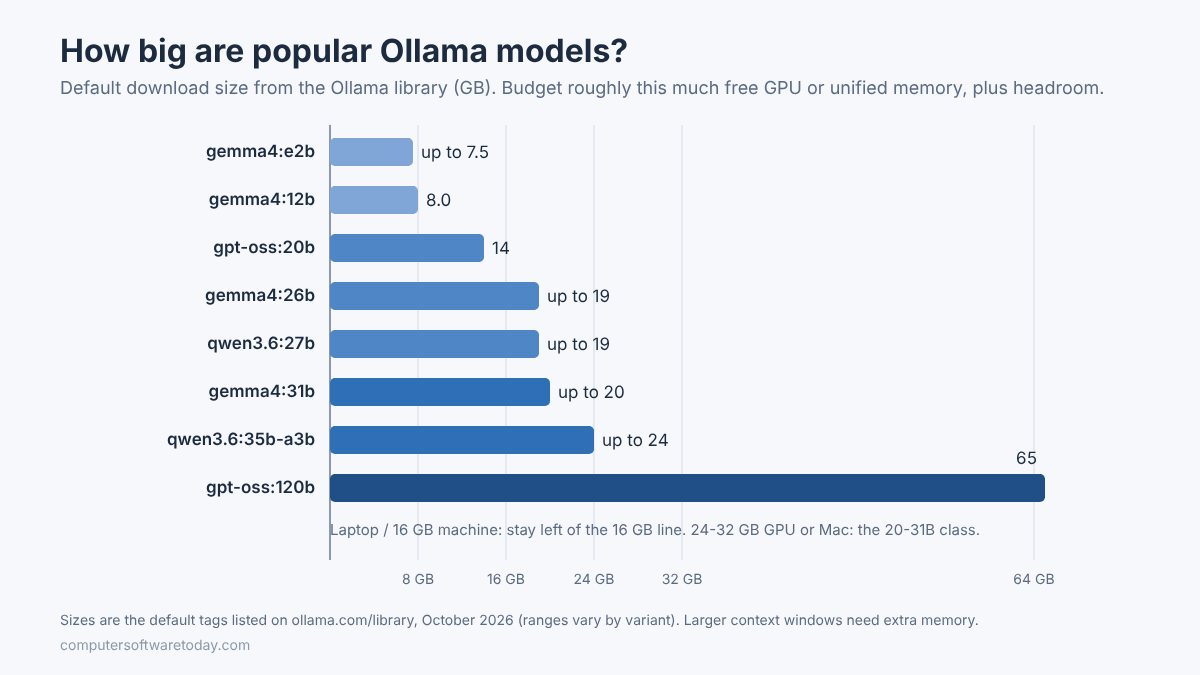
Memory is the constraint that matters. The model has to fit in GPU memory (VRAM) or, on Apple silicon, unified memory to run at a usable speed. A rough rule: budget the model’s download size plus a few gigabytes for context.
When a model does not fit in VRAM, Ollama splits it between GPU and CPU. It still works, just a lot slower. Run ollama ps and check the PROCESSOR column: “100% GPU” is what you want; a CPU/GPU split means you are spilling into system RAM.
| Your machine | Comfortable model size | Good starting models |
|---|---|---|
| 8 GB RAM, no dedicated GPU, or 8 GB Mac | 1B to 4B parameters | gemma4:e2b, llama3.2:3b |
| 16 GB RAM with an 8 GB GPU, or 16 GB Mac | Up to about 12B (20B at a squeeze) | gemma4:e4b, gemma4:12b, gpt-oss:20b |
| 16 to 24 GB VRAM, or 32 GB Mac | 20B to 31B | gpt-oss:20b, gemma4:26b, qwen3.6:27b, gemma4:31b |
| 48 GB+ VRAM, or 64 GB+ Mac | 35B and up, larger contexts | qwen3.6:35b-a3b; gpt-oss:120b needs about 80 GB |
These tiers are my rules of thumb, built from the download sizes on the Ollama model library. For example, the library lists gpt-oss:20b at 14 GB and says it can run with “as little as 16GB memory,” while the 120B version is meant for a single 80 GB GPU.

GPU support, according to Ollama’s hardware page: NVIDIA cards with compute capability 5.0 or newer and driver 550 or later; AMD Radeon RX 7600 through 7900 and PRO W7500 through W7900 on Windows via ROCm; Apple silicon via Metal; and additional cards on Windows and Linux through Vulkan. Intel Macs run on CPU only.
Disk space matters too. Ollama needs about 4 GB for itself, and models range from a few gigabytes to well over 60. An SSD makes model load times far less painful.
How do you install Ollama on Windows?
Download OllamaSetup.exe from ollama.com, run it (no administrator rights needed), then open a new terminal and run a model. You need Windows 10 22H2 or newer.
- Check the prerequisites. Per the Windows docs: Windows 10 22H2 or newer (Home or Pro), and NVIDIA driver 551.61 or newer if you have an NVIDIA card. AMD users need the ROCm v7 driver stack, or a Vulkan-capable Radeon driver.
- Run the installer. Download
OllamaSetup.exefrom ollama.com/download and run it. It installs into your user profile by default. To put the program on another drive:OllamaSetup.exe /DIR="D:\Ollama" - Move the model folder if C: is small. Models live in
%HOMEPATH%\.ollamaby default. Set a user environment variable, then quit Ollama from the system tray and start it again:setx OLLAMA_MODELS "D:\Ollama\models" - Open a new PowerShell window and test it:
ollama --version
ollama run gemma4:e2b
The first run downloads the model, then drops you into a chat prompt. Type /bye to exit. Ollama keeps running in the tray and serves its API at http://localhost:11434.
If you want Ollama running as a background service on a server rather than a desktop app, the docs also offer a standalone ollama-windows-amd64.zip for that purpose. On my own Windows Server I would keep it bound to localhost and put anything public-facing behind IIS with authentication, the same as any other internal API.
How do you install Ollama on a Mac?
Download the disk image, drag Ollama into Applications, and launch it once so it can add the ollama command to your PATH. You need macOS Sonoma (14) or newer.
- Check the requirements. The macOS docs require macOS 14 or newer. Apple silicon (M-series) gets GPU acceleration; Intel Macs run on CPU only, which is slow for anything beyond small models.
- Install. Download from ollama.com/download/mac, open
ollama.dmgand drag Ollama to Applications. - Launch it once. On first start it checks for the CLI and asks permission to link it into
/usr/local/bin. Say yes. - Test in Terminal:
ollama --version
ollama run gemma4:e4b
Models are stored in ~/.ollama. Apple silicon Macs are excellent local LLM machines because the GPU can use most of the unified memory; a 32 GB Mac can run models that would need an expensive graphics card on a PC.
Which local model should you choose?
Pick the largest model that fits comfortably in your GPU or unified memory, then test it on your real tasks. For general use start with Gemma 4; for coding try a Qwen coding variant; for a strong all-rounder on 16 GB+, try gpt-oss:20b.
The library has hundreds of models, and the names can be cryptic. The tag after the colon is usually the size (12b means 12 billion parameters) or a variant (-coding, -mlx, a quantization such as q4_K_M). A few sensible picks as of October 2026:
- Gemma 4 (
e2b,e4b,12b,26b,31b): Google’s open family, described on the model page as built for reasoning, agentic workflows, coding and multimodal tasks. Context windows run from 128K tokens on the small sizes to 256K on the larger ones. - gpt-oss (
20b,120b): OpenAI’s open-weight models, Apache 2.0 licensed. The 20B is a good fit for a 16 to 24 GB card. - Qwen 3.6 (
27b,35b-a3b, plus-codingtags): strong for code, with 256K context, if you have 24 GB or more. - Llama 3.2 (
1b,3b): tiny and fast, fine for classification, extraction and simple summaries on modest hardware.
Useful commands while you experiment:
ollama pull qwen3.6:27b-coding   # download without starting a chat
ollama ls                        # list downloaded models
ollama ps                        # what's loaded, and on GPU or CPU
ollama stop gemma4:12b           # unload from memory now
ollama rm gemma4:31b             # delete from disk
One setting catches almost everyone: Ollama’s default context length is 4,096 tokens, even when the model supports far more. If you paste in a long file and the answer ignores half of it, raise num_ctx in your API request or set OLLAMA_CONTEXT_LENGTH. Bigger contexts use more memory, so raise it only as far as you need.
How do you call a local Ollama model from C#?
Send an HTTP POST to http://localhost:11434/api/chat with a model name and messages. No API key is needed for local requests, and plain HttpClient is enough.
Here is a minimal .NET console example with no extra packages. It uses the native Ollama chat API with streaming turned off so you get one JSON response back:
using System.Net.Http.Json;
using System.Text.Json;

var http = new HttpClient
{
    BaseAddress = new Uri("http://localhost:11434"),
    Timeout = TimeSpan.FromMinutes(5) // first call includes model load time
};

var request = new
{
    model = "gemma4:e4b",
    stream = false,
    messages = new[]
    {
        new { role = "system", content = "You are a concise senior .NET engineer." },
        new { role = "user", content = "Explain IIS application pool recycling in three sentences." }
    }
};

var response = await http.PostAsJsonAsync("/api/chat", request);
response.EnsureSuccessStatusCode();

using var doc = JsonDocument.Parse(await response.Content.ReadAsStringAsync());
Console.WriteLine(doc.RootElement
    .GetProperty("message")
    .GetProperty("content")
    .GetString());
Note the longer timeout. HttpClient defaults to 100 seconds, and the first request after a model has been unloaded has to load gigabytes from disk first. Ollama keeps a model in memory for five minutes after its last use by default; set keep_alive in the request or OLLAMA_KEEP_ALIVE to change that.
For anything beyond a quick test, look at a client library such as OllamaSharp or the Microsoft.Extensions.AI abstractions, which let you swap between local and cloud models behind one interface.
How do you call Ollama from Python?
Install the official ollama package with pip and call chat(), or point the OpenAI Python client at http://localhost:11434/v1. The second option lets existing OpenAI code run locally with a one-line change.
With the official library (Python 3.8+):
pip install ollamafrom ollama import chat
response = chat(
model="gemma4:e4b",
messages=[{"role": "user", "content": "Summarize what a reverse proxy does."}],
)
print(response.message.content)Or reuse OpenAI-style code. Ollama’s OpenAI compatibility layer supports chat completions, responses, embeddings and model listing. The client insists on an API key, but Ollama ignores it:
from openai import OpenAI

client = OpenAI(base_url="http://localhost:11434/v1/", api_key="ollama")
reply = client.chat.completions.create(
    model="gpt-oss:20b",
    messages=[{"role": "user", "content": "Write a SQL Server query that finds duplicate emails."}],
)
print(reply.choices[0].message.content)
That compatibility is the most practical feature here. Develop against a local model for free, then point the same code at a cloud endpoint when you need more horsepower.
When does a local LLM beat the cloud?
Local wins on privacy, cost at volume, offline use and predictability. Cloud wins on raw quality, very long contexts and anything you need to scale to many users. Most developers end up using both.
Where I would choose local:
- Processing data that should not leave the building: client code, support tickets, logs with personal data.
- High-volume, low-difficulty jobs: tagging, extracting fields, short summaries, generating test data.
- Development and testing of AI features, so you are not paying per token while you debug a prompt for the twentieth time.
- Embeddings for search and RAG, where small local embedding models such as
nomic-embed-textdo the job well.
Where I would stay with the cloud: hard reasoning, large multi-file coding tasks, and anything customer-facing where answer quality is the product. A 20B model on a desktop is impressive, but it is not going to out-think the largest hosted models.
One more point. Ollama now also offers optional hosted cloud models. If you want to be sure nothing leaves your machine, the FAQ documents switching cloud features off with OLLAMA_NO_CLOUD=1. By default the API listens only on 127.0.0.1; leave it that way unless you have a reason and a firewall rule.
Bottom line
Running a local LLM with Ollama is now a 10-minute job on Windows or a Mac, and it is genuinely useful, not just a toy. Match the model to your memory, raise the context length when you need it, and call it over plain HTTP from whatever language you already write. Keep the cloud for the hard problems and let the box under your desk handle the private and the repetitive. It does not send you an invoice.
FAQ
Is Ollama free?
Yes. Ollama is open source under the MIT license and free to run locally. The models carry their own licenses, for example Apache 2.0 for gpt-oss, so check the model page before commercial use. Its optional hosted cloud models are a separate service.
Can I run Ollama without a GPU?
Yes, but it is slow for anything except small models. On a CPU-only machine with 8 to 16 GB of RAM, stick to models in the 1B to 4B range such as gemma4:e2b or llama3.2:3b.
How much RAM do I need for a 7B or 8B model?
Plan on at least 16 GB of system RAM, or about 8 GB of free VRAM, for a typical quantized 7B to 8B model to run comfortably. Larger context windows need more memory on top of that.
Does Ollama send my prompts to the internet?
Not when you run local models. Ollama’s FAQ says it does not see your prompts or data when running locally. You can also disable its optional cloud features with OLLAMA_NO_CLOUD=1.
Why does my local model ignore part of a long document?
Ollama’s default context length is 4,096 tokens. Increase it with the num_ctx option in your API request, /set parameter num_ctx in the chat, or the OLLAMA_CONTEXT_LENGTH environment variable, within your memory limits.
Can I use Ollama with existing OpenAI code?
Yes. Point the OpenAI client at http://localhost:11434/v1/ and pass any placeholder API key. Ollama supports chat completions, responses, embeddings and model listing through this compatibility layer.
Featured image: Photo by Natalia S on Pexels.