


The Model Context Protocol (MCP) is an open standard that lets an AI application talk to outside tools and data through one common interface. Instead of writing a custom plugin for every AI product, you write one MCP server, and any MCP-capable client (Claude Code, VS Code, Cursor and others) can use it. Here is how it works, where it bites, and how to try it.
What is the Model Context Protocol, in plain English?
MCP is a client-server protocol, built on JSON-RPC 2.0, that defines how an AI application discovers and calls external capabilities. Think of it as a standard plug between a language model and the rest of your systems.
A language model on its own cannot read your database, check your ticket queue, or look at the file you just saved. Every vendor solved this differently for a while, so if you wanted your internal API in three AI tools, you wrote three integrations.
MCP replaces that with one contract. Anthropic introduced it in late 2024, and in December 2025 donated it to the Agentic AI Foundation, a directed fund under the Linux Foundation co-founded with Block and OpenAI. At that point Anthropic reported more than 10,000 active public MCP servers and over 97 million monthly SDK downloads across Python and TypeScript. So this is no longer one company’s side project. It is the closest thing the industry has to a USB port for AI tools.
What problem does MCP actually solve?
MCP turns an “every app times every tool” integration problem into “every app plus every tool.” Each AI client implements MCP once, each service exposes an MCP server once, and they all work together.
If you have spent time in enterprise integration, you have seen this movie before. Before ODBC, every reporting tool needed a driver for every database. Before LSP (the Language Server Protocol), every editor needed its own plugin for every language. MCP borrows the LSP idea directly: the expensive, domain-specific logic lives in a server, and the clients stay generic.
For a working developer, the practical benefits are:
- Write once. An MCP server for your internal order system works in any MCP host your team uses, not just one IDE.
- Discovery at runtime. The client asks the server what it can do. You do not hard-code a tool list into the AI app.
- A clear trust boundary. The server decides what the model is allowed to touch. The model never gets your connection string; it gets a tool called
run_readonly_querythat you wrote.
That last point is the difference between “the AI has access to production” and “the AI can call three functions I reviewed.”
How does MCP work? Hosts, clients and servers
An MCP host (the AI application) creates one MCP client per server it connects to. Each client keeps a dedicated connection to its server, and messages travel as JSON-RPC over either stdio or Streamable HTTP.
The official architecture overview names three participants:
- MCP host: the AI application the user works in, such as Claude Code, Claude Desktop or Visual Studio Code.
- MCP client: a component inside the host that holds the connection to one server.
- MCP server: the program that exposes tools and data. It can run locally or remotely.

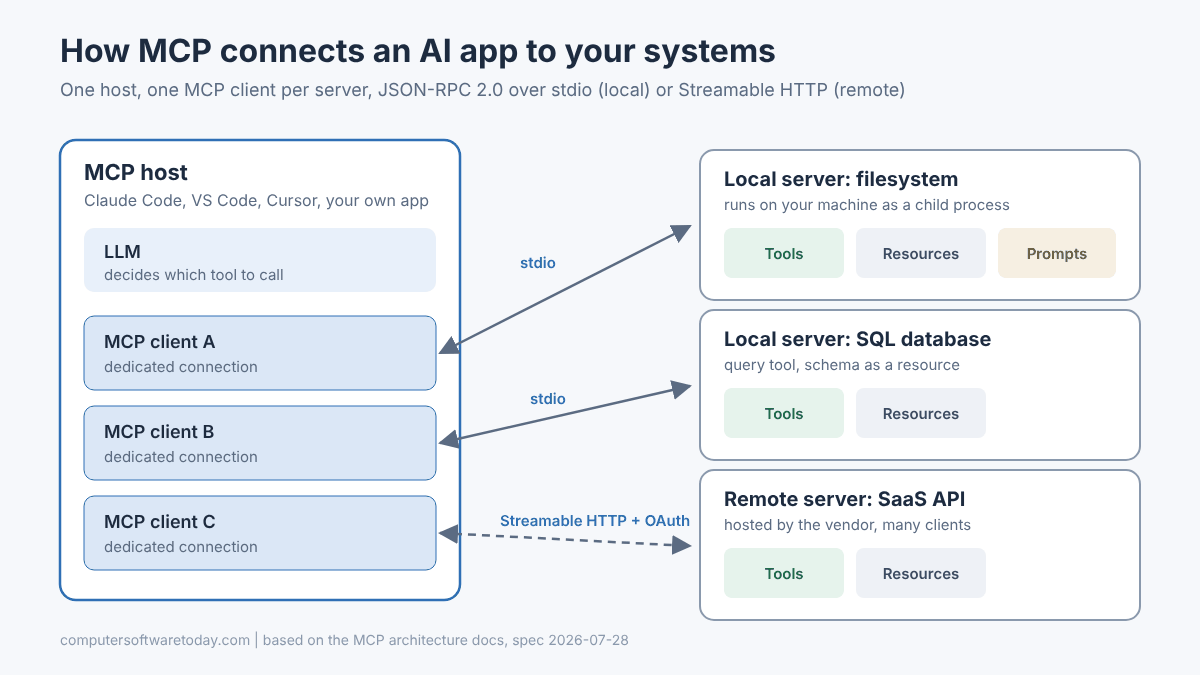
There are two transports. Stdio is for local servers: the host launches the server as a child process and talks to it over standard input and output. No ports, no network. Streamable HTTP is for remote servers: requests go over HTTP POST, with optional server-sent events for streaming, and the spec recommends OAuth for authentication. A local filesystem server typically serves one client; a vendor-hosted remote server serves many.
The flow in a real session is simple. The client asks the server what tools it has (tools/list). The host hands those tool descriptions to the model. When the model decides it needs one, the host sends tools/call with the arguments, gets the result back, and feeds it into the conversation.
What are MCP tools, resources and prompts?
Servers expose three core primitives: tools (functions the model can call), resources (read-only context such as files or schemas) and prompts (reusable templates the user can pick). Tools are the one you will use most.
| Primitive | What it is | Who usually triggers it | Example |
|---|---|---|---|
| Tools | Executable functions with a JSON Schema for their inputs | The model | create_invoice, run_query, get_weather |
| Resources | Data the app can read for context | The application or user | A database schema, a log file, an API response |
| Prompts | Parameterized templates for common tasks | The user | “Review this pull request against our style guide” |
The docs give a good mental model: a database server might expose query tools, the schema as a resource, and a prompt with a few worked examples of how to use the tools well.
Clients can also offer things back to servers. The main one is elicitation, which lets a server ask the user for more input or a confirmation mid-task (“You are about to delete 40 rows. Continue?”). Sampling and logging, two older client features, were marked deprecated in the current spec.
Each tool carries a name, a human-readable title, a description, and an input schema. The description is what the model reads to decide when to use the tool, so treat it like documentation. Vague descriptions produce vague tool use.
What changed in the 2026-07-28 MCP specification?
The current spec, released July 28, 2026, made the protocol stateless: the old initialize handshake and session ID header are gone, and every request carries its own version and capability information. That makes remote MCP servers much easier to scale.
MCP versions are dated strings (YYYY-MM-DD) that mark the last backward-incompatible change. According to the release post, the headline changes in 2026-07-28 were:
- Stateless core. No
initializehandshake and noMcp-Session-Id. Each request carries protocol version, client identity and capabilities in_meta. An optionalserver/discovercall returns what a server supports. - Gateway-friendly HTTP. Requests include
Mcp-MethodandMcp-Nameheaders so load balancers can route without parsing JSON. - Cacheable lists. Tool, prompt and resource lists now carry cache hints.
- Extensions. Long-running Tasks, MCP Apps (interactive UI) and enterprise-managed authorization moved into a formal extensions framework.
- Deprecations with a 12-month window. Roots, sampling, logging, the legacy HTTP+SSE transport and Dynamic Client Registration are deprecated but still work for at least a year.
For anyone running apps behind IIS or a load balancer, the stateless change is the big one. If a server needs state, it now returns an explicit handle (a cart ID, a job ID) and the model passes it back on later calls, which is how most of us would have designed it anyway.
What can you do with MCP servers? Real examples
Anything you can wrap in a function: reading files, querying databases, searching issue trackers, calling internal APIs, checking monitoring systems. The most useful servers are narrow and boring.
A few patterns I find genuinely useful as a developer:
- Filesystem access with limits. The reference filesystem server lets the model read and write only inside directories you pass on the command line.
- Read-only database access. A small server with a query tool that connects as a read-only SQL login. The model can answer “how many orders shipped late last week?” without you writing the query.
- Error tracking and monitoring. Vendors such as Sentry run hosted MCP servers, so the assistant can pull the stack trace for an issue while it is looking at your code.
- Your own line-of-business API. Wrap three or four endpoints you trust (look up customer, check order status) and stop there.
Where it gets less useful: servers that expose fifty tools. Every tool description eats context, and the model gets worse at picking the right one as the list grows. The spec now even documents progressive tool discovery for clients that federate many servers. My rule of thumb is that if I cannot explain why each tool exists, it should not be there.
Is MCP secure? The risks you need to know
The protocol itself is reasonable, but an MCP server is code running with your privileges and text the model will trust. Treat every server like a third-party dependency with shell access, because that is roughly what it is.
The main risks, drawn from the official security best practices and independent research:
- Local server compromise. A local server is a program you downloaded and ran. A malicious package or a poisoned startup command in a config file can read your SSH keys and send them anywhere. The spec requires clients that offer one-click install to show the exact command and get explicit consent.
- Tool poisoning. Hidden instructions inside a tool’s description, which the model reads but you usually do not see. Invariant Labs disclosed this in April 2025, and the Cloud Security Alliance has since written it up along with “rug pulls,” where a tool changes after you approved it.
- Prompt injection through data. A ticket, web page or email returned by a tool can contain instructions. The model may follow them.
- Token mistakes on remote servers. The spec forbids “token passthrough” (forwarding a client’s token to a downstream API) and calls out confused-deputy and SSRF attacks around OAuth.
What I actually do: install servers only from sources I would trust with a NuGet or npm dependency, read the README and the tool list, give database servers a read-only login, scope filesystem servers to one project folder, and keep human approval turned on for anything that writes, sends or deletes. Least privilege did not stop being good advice just because the caller is a model.
How do you try an MCP server today?
The fastest route is to add a reference server to a client you already use, then poke at it with the MCP Inspector. You need Node.js installed; the whole thing takes a few minutes.
- Look at a server with the Inspector first. The MCP Inspector needs Node 22.19.0 or newer and runs through
npx. This opens a browser UI where you can list and call tools by hand:npx -y @modelcontextprotocol/inspector npx @modelcontextprotocol/server-filesystem ~/Desktop - Or list the tools from the command line, which is handy in scripts:
npx @modelcontextprotocol/inspector --cli node path/to/server/index.js --method tools/list - Add it to your AI client. In Claude Code, a local stdio server goes after a
--separator, and a remote server uses--transport http:claude mcp add files -- npx -y @modelcontextprotocol/server-filesystem C:\projects\demo claude mcp add --transport http myapi https://example.com/mcp claude mcp list - Ask a question that needs the tool, such as “list the files in the demo folder and summarize the README,” and watch the tool call get proposed and approved.
Other hosts such as VS Code and Cursor have their own config files for this; check each product’s docs, since locations change between releases.
How hard is it to build your own MCP server?
Not hard. Official SDKs exist for TypeScript, Python, Go, C# and more, and a working server is a few dozen lines. The hard part is deciding which tools to expose and how to describe them.
On the .NET side, Microsoft shipped version 2.0 of the official MCP C# SDK alongside the new spec. Start with the ModelContextProtocol package for stdio servers, or ModelContextProtocol.AspNetCore for an HTTP server. Here is the minimal HTTP shape from Microsoft’s announcement:
// dotnet add package ModelContextProtocol.AspNetCore
using ModelContextProtocol.Server;
using System.ComponentModel;

var builder = WebApplication.CreateBuilder(args);
builder.Services.AddMcpServer()
    .WithHttpTransport()
    .WithToolsFromAssembly();

var app = builder.Build();
app.MapMcp();
app.Run("http://localhost:3001");

[McpServerToolType]
public static class EchoTool
{
    [McpServerTool, Description("Echoes the message back to the client.")]
    public static string Echo(string message) => $"hello {message}";
}
The Description attribute is not decoration. It becomes the text the model reads to decide whether to call your method. Write it the way you would write an XML doc comment for a junior developer who will take every word literally.
If you host it the way I host most things, behind IIS with a Let’s Encrypt certificate, put authentication in front of it before it ever leaves localhost. An unauthenticated MCP endpoint on the public internet is an open API that also happens to be easy for a model to abuse.
Bottom line
MCP is the boring, useful kind of standard: a JSON-RPC contract that lets AI tools find and call your code without a custom integration per product. It is now vendor-neutral, the SDKs are solid, and the 2026 spec fixed the scaling pain for remote servers. Start with one read-only server against something you know well, watch what the model does with it in the Inspector, and only then give it anything that writes. Trust gets earned one tool at a time.
FAQ
Who owns the Model Context Protocol?
Anthropic created MCP and released it in late 2024. In December 2025 it was donated to the Agentic AI Foundation, a directed fund under the Linux Foundation co-founded by Anthropic, Block and OpenAI, so it is now governed as an open project.
Is MCP the same as function calling?
No. Function calling is how a model asks the host app to run a function. MCP standardizes where those functions come from: the host discovers them from MCP servers at runtime instead of having them hard-coded, so one server works across many AI apps.
What is the current MCP spec version?
As of October 2026 the current version is 2026-07-28. It made the protocol stateless, added gateway-friendly HTTP headers and formalized extensions. Older handshake-based versions such as 2025-11-25 are still supported through backward-compatibility rules.
Do I need to know Python or TypeScript to build an MCP server?
No. There are official SDKs for several languages, including C# (version 2.0, from Microsoft), Go, Python and TypeScript. Pick the language your team already maintains, since the server usually wraps existing code.
Can an MCP server run on Windows?
Yes. Local stdio servers run anywhere the runtime does, including Windows, and remote servers are ordinary HTTP services. An ASP.NET Core MCP server can be hosted behind IIS like any other app, with HTTPS and authentication in front.
Are MCP servers safe to install?
Only as safe as their source. A local server runs with your user account’s permissions, and tool descriptions can carry hidden instructions. Install from trusted publishers, review the tool list, use least-privilege credentials and keep approval prompts on for write actions.
Featured image: Photo by Pixabay on Pexels.