
RAG Explained: Make AI Answer From Your Own Documents
Retrieval-augmented generation (RAG) makes an AI model answer from your own documents: you split the documents into chunks, turn each chunk into an embedding vector, find the chunks closest to a user’s question, and paste them into the prompt. This guide explains each piece, shows a minimal working design, and covers the mistakes and the cases where RAG is the wrong tool.
What is RAG, in plain English?
RAG is a pattern where you search your own content first, then hand the best matches to a language model along with the question. The model answers from what you gave it instead of from memory alone.
A language model knows what was in its training data, which does not include your employee handbook, your product manuals or last week’s support tickets. You could paste everything into every prompt, but that gets slow and expensive fast, and it stops working once your content is bigger than the context window. RAG fixes that with a search step: retrieve only the few passages that matter, then generate the answer.
The term comes from a 2020 paper by Patrick Lewis and colleagues, Retrieval-Augmented Generation for Knowledge-Intensive NLP Tasks, which combined a generator model with a searchable index of Wikipedia. Today the name covers any system that does “search, then generate.”
Think of it as an open-book exam. The model is still doing the reasoning and the writing, but it is reading from the pages you put in front of it. If you hand it the wrong pages, it will confidently answer from the wrong pages. Most of this article is about handing it the right ones.
How does RAG work, step by step?
RAG has two phases. Indexing happens ahead of time: chunk the documents, embed each chunk, store the vectors. Answering happens per question: embed the question, find the nearest chunks, and send them to the model with the question.
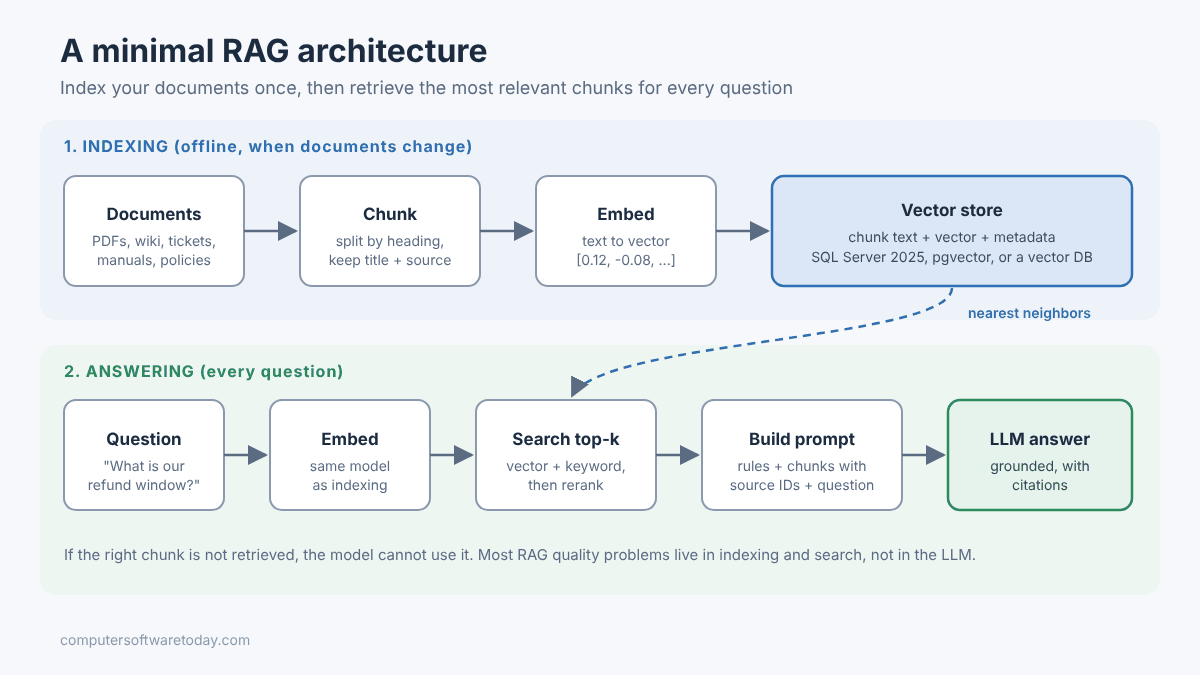
Indexing (runs when documents change):
- Load the documents and extract clean text (PDF extraction is often the ugliest part).
- Split the text into chunks, keeping the document title, section heading and source link with each one.
- Run each chunk through an embedding model to get a vector.
- Store chunk text, vector and metadata in a database that can search by vector similarity.
Answering (runs on every question):
- Embed the user’s question with the same embedding model.
- Find the top few chunks whose vectors are closest to the question’s vector, optionally combined with keyword search and a reranker.
- Build a prompt: instructions, the retrieved chunks with their source IDs, then the question.
- Have the model answer using only that context, citing the sources it used.
That is the whole architecture. Everything else you read about RAG is a refinement of one of those eight steps.
What are embeddings, and why do they matter?
An embedding is a list of numbers that represents the meaning of a piece of text. Texts with similar meaning get vectors that sit close together, so “refund window” and “how long do I have to return an item” match even with no shared words.
An embedding model is a smaller, specialized model whose only job is turning text into vectors. A common size is several hundred to a few thousand dimensions; Nomic Embed Text v1.5, for example, outputs 768 dimensions by default. You can run embedding models in the cloud or locally; with Ollama, nomic-embed-text is one of the most-pulled models in its library.
“Close together” is usually measured with cosine distance, which compares the angle between two vectors. Three rules matter more than which model you pick:
- Use the same model for documents and questions. Vectors from different models are not comparable. Changing models means re-embedding everything.
- Store the model name and version with the vectors. Future you will want to know.
- Embeddings capture meaning, not exact tokens. They are weak at part numbers, error codes and names. That is why keyword search still matters, which we will come back to.
How does vector search work?
Vector search finds the stored vectors closest to the query vector. For small collections you can compare against every row exactly; for large ones you use an approximate nearest-neighbor index that trades a little accuracy for a lot of speed.
You do not need a specialized vector database to start. If you already run SQL Server, SQL Server 2025 has a native vector type and vector functions, generally available, along with Azure SQL. VECTOR_DISTANCE computes an exact distance with cosine, Euclidean or dot-product metrics. Approximate vector indexes, based on DiskANN, are generally available in Azure SQL Database but still in preview in SQL Server 2025 itself, so check before you depend on them on-premises.
A minimal table and exact search look like this:
CREATE TABLE dbo.DocChunks (
    Id         INT IDENTITY PRIMARY KEY,
    Source     NVARCHAR(400) NOT NULL,   -- file name, URL, section
    ChunkText  NVARCHAR(MAX) NOT NULL,
    Embedding  VECTOR(768)   NOT NULL    -- match your embedding model
);

-- @q is the question's embedding, computed in your app
SELECT TOP (5) Id, Source, ChunkText,
       VECTOR_DISTANCE('cosine', Embedding, @q) AS Distance
FROM dbo.DocChunks
ORDER BY Distance;
Per the VECTOR_DISTANCE documentation, it always does an exact scan and never uses a vector index. For tens of thousands of chunks that is usually fine. On PostgreSQL the equivalent is the pgvector extension; dedicated vector databases make sense when you get into millions of chunks or need heavy filtering at speed.
How should you chunk documents for RAG?
Split along the document’s natural structure (headings, sections, paragraphs), keep chunks a few hundred words long with a little overlap, and attach the document title and section path to every chunk. Bad chunking is the most common cause of bad RAG answers.
The goal is that each chunk makes sense on its own. A chunk that reads “It must be submitted within 30 days” is useless if retrieval cannot tell what “it” is. Practical guidance:
- Respect structure. Split on headings first, then paragraphs. Never cut a table or a code block in half if you can help it.
- Prepend context. Put “Employee Handbook > Leave Policy > Bereavement” at the top of the chunk text before embedding.
- Use modest overlap. Repeating a sentence or two between neighboring chunks prevents answers falling into the gap.
- Keep metadata. Source, page, date and access level go in columns, so you can filter and cite.
Anthropic’s contextual retrieval write-up quantified how much this helps. Adding a short, model-generated context to each chunk before embedding cut their top-20 retrieval failure rate by 35 percent; adding keyword (BM25) search on top brought the reduction to 49 percent; adding a reranking step brought it to 67 percent. Those are their benchmarks, not a guarantee for your data, but the direction is consistent with what most practitioners see.
What does a minimal RAG system look like in code?
About 30 lines: an embedding call, a similarity search, and a chat call with the retrieved text in the prompt. Here is a version in Python that runs entirely on a local machine through Ollama’s OpenAI-compatible API.
It assumes you have pulled an embedding model and a chat model (ollama pull nomic-embed-text and ollama pull gemma4:e4b) and installed openai and numpy. For a few thousand chunks, an in-memory NumPy array is a perfectly good vector store.
import numpy as np
from openai import OpenAI

client = OpenAI(base_url="http://localhost:11434/v1/", api_key="ollama")
EMBED_MODEL, CHAT_MODEL = "nomic-embed-text", "gemma4:e4b"

def embed(texts):
    resp = client.embeddings.create(model=EMBED_MODEL, input=texts)
    v = np.array([d.embedding for d in resp.data], dtype=np.float32)
    return v / np.linalg.norm(v, axis=1, keepdims=True)  # normalize for cosine

chunks = [
    {"id": "handbook#refunds", "text": "Refund policy: customers may return items within 30 days..."},
    {"id": "handbook#shipping", "text": "Shipping: orders ship within 2 business days..."},
    # ...load the rest from your chunking step
]
index = embed([c["text"] for c in chunks])

def answer(question, k=4):
    q = embed([question])[0]
    top = np.argsort(index @ q)[::-1][:k]          # highest cosine similarity
    context = "\n\n".join(f"[{chunks[i]['id']}]\n{chunks[i]['text']}" for i in top)
    reply = client.chat.completions.create(
        model=CHAT_MODEL,
        messages=[
            {"role": "system", "content":
             "Answer only from the sources below. Cite source IDs in brackets. "
             "If the sources do not contain the answer, say you don't know."},
            {"role": "user", "content": f"Sources:\n{context}\n\nQuestion: {question}"},
        ],
    )
    return reply.choices[0].message.content

print(answer("How long do customers have to return something?"))
Two lines in that system prompt do a lot of work: “answer only from the sources” and “say you don’t know.” Without them, the model will happily fill gaps from its general knowledge, which is exactly what you were trying to avoid. In production, move the vectors into SQL Server or Postgres and the same shape holds.
What are the most common RAG mistakes?
Most RAG failures are retrieval failures: the right chunk was never found. After that come prompts that let the model ignore the context, no evaluation set, stale indexes, and ignoring who is allowed to see which document.
- Judging by the final answer only. When an answer is wrong, first check whether the right chunk was retrieved. If not, no prompt tweak will fix it.
- Vector search only. Embeddings miss exact identifiers. Combine vector search with keyword search (hybrid search) for part numbers, error codes and names.
- Too many chunks in the prompt. More is not always better. The “Lost in the Middle” study found models use information at the start and end of a long context better than information buried in the middle. Retrieve generously, rerank, then send the best few.
- No test set. Write 30 to 50 real questions with known answers and their source documents. Re-run them after every change. This is the single most useful thing you can build.
- Stale index. The policy changed in March; the vectors are from January. Re-index on document change and store a last-updated date.
- Ignoring permissions. If a user cannot open the HR salary file, retrieval must not return chunks from it. Filter by access in the query, not after the answer is written.
- Trusting retrieved text blindly. A document in your index can contain instructions aimed at the model. Treat retrieved content as data, especially if anyone outside your team can add documents.
When should you not use RAG?
Skip RAG when your content is small enough to fit in the prompt, when the answer lives in structured data you can query directly, or when you need the model to learn a style or skill rather than look up facts.
- Small knowledge base. Anthropic’s guidance in the same write-up is that a knowledge base under about 200,000 tokens (roughly 500 pages) can simply go in the prompt, especially with prompt caching. No index, no chunking bugs.
- Structured data. “How many orders shipped late last month?” is a SQL question. Give the model a tool that runs a safe, parameterized query instead of embedding order rows.
- Behavior, not facts. If you want a consistent tone or format, better instructions and examples (or fine-tuning) beat retrieval.
- High-stakes answers without review. RAG reduces made-up answers; it does not eliminate them. For legal, medical or financial answers, keep a human in the loop and show the sources.
Also consider whether you need a chat interface at all. Sometimes plain full-text search with good snippets answers the question faster and with no risk of a fabricated sentence.
Bottom line
RAG is not exotic: it is search plus a prompt. Get the search right with sensible chunks, hybrid retrieval and a reranker, tell the model to stay inside the sources and cite them, and build a small test set so you know when a change helps. Start in the database you already run; for me that would be SQL Server’s vector type before any new piece of infrastructure. And if your documents fit in the prompt, skip RAG entirely and enjoy the afternoon off.
FAQ
What does RAG stand for?
Retrieval-augmented generation. The system retrieves relevant passages from your own content, then a language model generates an answer using those passages as context. The term comes from a 2020 paper by Patrick Lewis and colleagues.
Is RAG better than fine-tuning?
For facts that change or must be cited, yes. RAG can be updated by re-indexing documents and shows its sources. Fine-tuning is better for teaching a consistent style or format, and the two can be combined.
Do I need a vector database for RAG?
Not to start. A few thousand chunks fit in memory, and SQL Server 2025, Azure SQL and PostgreSQL with pgvector all support vector search. Dedicated vector databases help at millions of chunks or with heavy filtered search.
How big should RAG chunks be?
Big enough to make sense on their own, usually a few hundred words, split along headings and paragraphs with a little overlap. Add the document title and section path to each chunk so it carries its own context.
Can RAG run entirely on my own computer?
Yes. Tools like Ollama can run both an embedding model and a chat model locally, and the vectors can live in memory or a local database, so no document text leaves your machine.
Why does my RAG system give wrong answers?
Usually because the right chunk was not retrieved. Check retrieval first, then add keyword search and reranking, improve chunking, and instruct the model to answer only from the sources and say when it does not know.
Featured image: Photo by Zetong Li on Pexels.
About The Author

